Automating Versioning Releases
How does it work?
Commit message format
semantic-release uses the commit messages to determine the consumer impact of changes in the codebase. Following formalized conventions for commit messages, semantic-release automatically determines the next semantic version number, generates a changelog and publishes the release.
The table below shows which commit message gets you which release type when semantic-release runs (using the default configuration):
| Commit message | Release type |
|---|---|
fix(pencil): stop graphite breaking when too much pressure applied | Fix Release |
feat(pencil): add 'graphiteWidth' option | Feature Release |
perf(pencil): remove graphiteWidth optionBREAKING CHANGE: The graphiteWidth option has been removed.The default graphite width of 10mm is always used for performance reasons. | Breaking Release (Note that the BREAKING CHANGE: token must be in the footer of the commit) |
SemVer
| Semver illustration |
|---|
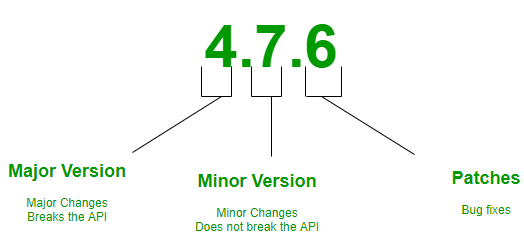 |
- If the body contains the text “BREAKING CHANGE” then MAJOR version is incremented.
- If the type contains feat/feature, then MINOR version is incremented.
- If the type contains fix, then PATCH version is incremented.
- And finally, if the type contains refactor/style/perf/doc/test/chore, then nothing is increment and no release is made.
How to trigger release
Conventional Commits
Conventional commit is a specification, a set of rules that have to be followed when writing commit messages.
| Conventional Commits |
|---|
 |
Only type and description are mandatory, rest everything is optional. The value of type is important and needs to be only one of the following —
- feat: A new feature
- fix: A bug fix
- docs: Documentation only changes
- style: Changes that do not affect the meaning of the code (white-space, formatting, missing semi-colons, etc)
- refactor: A code change that neither fixes a bug nor adds a feature
- perf: A code change that improves performance
- test: Adding missing or correcting existing tests
- chore: Changes to the build process or auxiliary tools and libraries such as documentation generation
Below are some sample commits made using this specification —
feat(logging): added logs for failed signups
fix(homepage): fixed image gallery
test(homepage): updated tests
docs(readme): added new logging table information
⚠️ How to trigger a BREAKING CHANGE release?
Breaking changes
All breaking changes have to be mentioned as a breaking change block in the footer of the commit, which should start with the word BREAKING CHANGE: with a space or two newlines. The rest of the commit message is then the description of the change, justification and migration notes.
perf(pencil): remove graphiteWidth option


BREAKING CHANGE: The graphiteWidth option has been removed. The default
graphite width of 10mm is always used for performance reasons.